CORRECT way to manage Scenes and Subscenes in Unity ECS
 Tale Forge
Nov 1, 2024 10:30
Tale Forge
Nov 1, 2024 10:30
Create an account to hide videos, mark them watched, or save them to Don't Miss.
Create an account to hide videos, mark them watched, or save them to Don't Miss.
Create an account to hide videos, mark them watched, or save them to Don't Miss.
Chapters
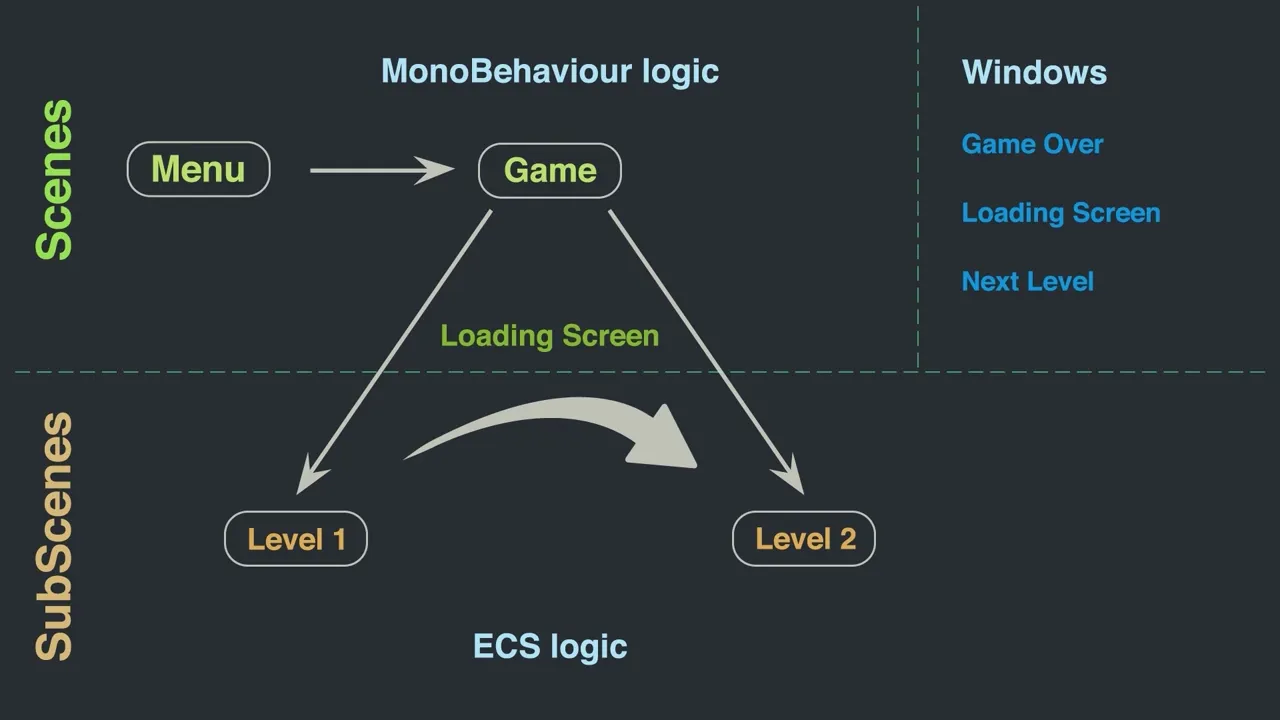
Today we will implement the logic of the following UI classes:
NextLevelWindowController - from which we go to the next level (so ECS Subscene).
GameOverWindowController - from which we will return to the Menu scene.
MenuController – from which we go to the Game scene.
And – of course – ECS systems like LevelSystem and extend GameOverSystem & InputSystem implementations.
We will cover Loading Screen triggered when switching between SubScenes or Scenes - in a next video.
So let's dive in and see how it works!
--------------------
We appreciate your support on the Patreon:
https://patreon.com/TaleForge
---------------------
Social Media:
Discord:
https://discord.gg/gZssNGuDdc
Facebook:
https://www.facebook.com/taleforge/
Instagram:
https://www.instagram.com/taleforgegames/
LinkedIn:
https://www.linkedin.com/company/tale-forge/
Reddit:
https://www.reddit.com/user/taleforge
Tiktok:
https://www.tiktok.com/@taleforge
Twitter:
https://twitter.com/TaleForgeStudio
#taleforge #unity #ecs #tutorial #gamedev #games #programming #education #learning #trending
Education
#Unity
#2D
#Game
#Developer
#Programmer
#Tutorial
#TaleForge
#ECS
#GameDev
#Programming
#Trending
#Education
#Learning
#Unity3D
#DOTS