MicroVerse Tip: Flexible Texture Filter Assignment
 Roland C
Nov 21, 2025 17:10
Roland C
Nov 21, 2025 17:10
Create an account to hide videos, mark them watched, or save them to Don't Miss.
Create an account to hide videos, mark them watched, or save them to Don't Miss.
Create an account to hide videos, mark them watched, or save them to Don't Miss.
Chapters
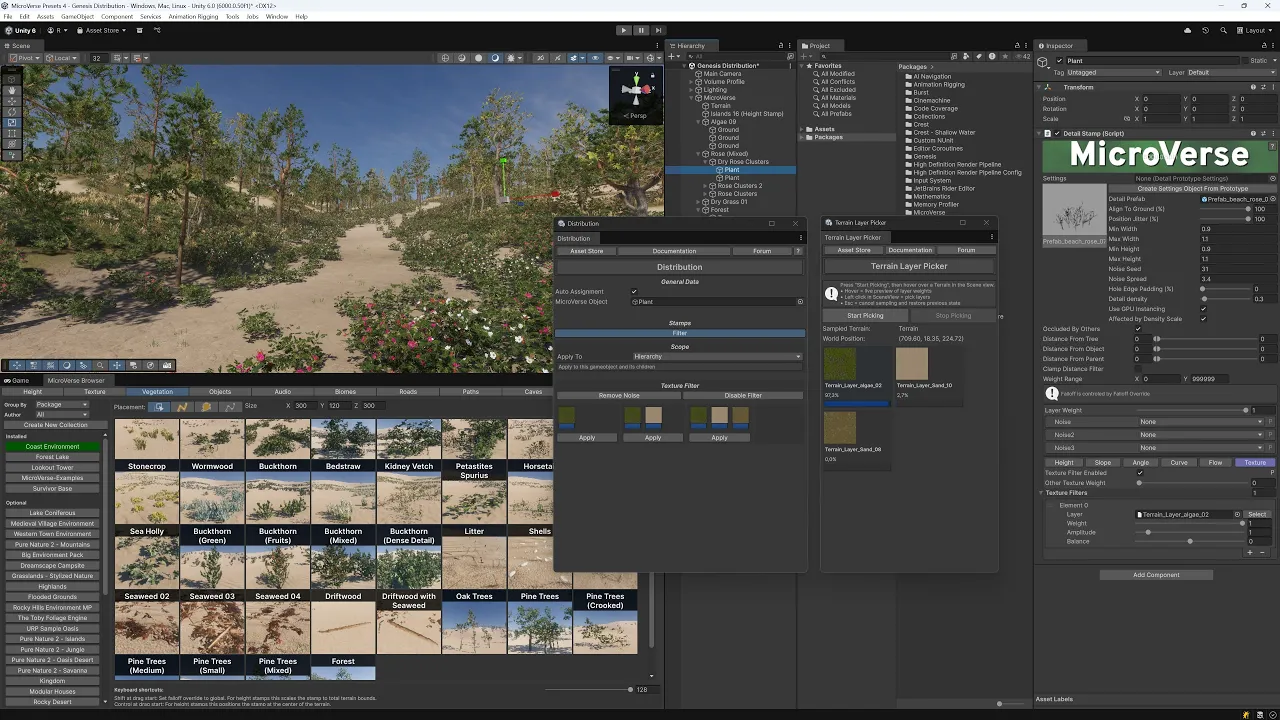
The texture filter of MicroVerse is awesome, it can distribute your vegetation depending on the terrain layers. Since I've been using it more and more lately I thought of a way to apply the texture filter quicker. So I created a terrain layer picker which upon press of a button has the dominant terrain layers assigned to the stamps. The picker shows the percentage of the terrain layers that are used in the splatmap. With my biomes & presets creations I figured that at max 3 overlapping layers give a pleasent distinct placement, so I left it with a choice of the top 1, 2 or 3 terrain layers simultaneously applied.
I also figured I'd add more of that quick distribution kind in the future, so I created a dedicated Distribution panel for it in Genesis. This video is a showcase about how it's used.
The update to Genesis is already live on the Unity Asset Store. Feel free to give it a try.
Also, please note that it's Black Friday Sale on the Unity Asset Store. If you don't have Coast & Dunes Environment yet, now's the time to get it. A really impressive, well performing and highly recommended asset.
Assets used:
* [⭐ Black Friday Sale ⭐] World Building Bundle for MicroVerse
https://assetstore.unity.com/packages/tools/terrain/world-building-bundle-for-microverse-243593?aid=1011lfvh6&pubref=riwbbmv&utm_source=aff
(Ultimate StampIT! Collection and Genesis for MicroVerse included)
includes
* [⚡ Flash Deal ⚡] Ultimate StampIT! Collection
https://assetstore.unity.com/packages/3d/environments/landscapes/ultimate-stampit-collection-221299?aid=1011lfvh6&pubref=riusc&utm_source=aff
(Note: Included in World Building Bundle for MicroVerse)
* [⭐ Black Friday Sale ⭐] MicroVerse - Core Collection
https://assetstore.unity.com/packages/tools/terrain/microverse-core-collection-232976?aid=1011lfvh6&pubref=jbmvcc&utm_source=aff
* [⭐ Black Friday Sale ⭐] Coast & Dunes Environment - Dynamic Nature (Beach Sea Islands Dry Desert)
https://assetstore.unity.com/packages/3d/vegetation/coast-dunes-environment-dynamic-nature-beach-sea-islands-dry-des-309456?aid=1011lfvh6&pubref=nmcde&utm_source=aff
* [⭐ New Release Sale ⭐] Biomes and Presets 5 for MicroVerse
https://assetstore.unity.com/packages/tools/terrain/biomes-and-presets-5-for-microverse-342292?aid=1011lfvh6&pubref=ribpmv5&utm_source=aff
includes
* Biomes and Presets 4 for MicroVerse
https://assetstore.unity.com/packages/tools/terrain/biomes-and-presets-4-for-microverse-312857?aid=1011lfvh6&pubref=ribpmv4&utm_source=aff
* SceneNav - Smooth & Fast Scene Navigation
https://assetstore.unity.com/packages/tools/utilities/scenenav-smooth-fast-scene-navigation-220117?aid=1011lfvh6&pubref=sn&utm_source=aff
* Photo Session
https://assetstore.unity.com/packages/tools/camera/photo-session-227393?aid=1011lfvh6&pubref=rips&utm_source=aff
Music used:
Sky Mubs - A Warrior In Your Heart
https://www.youtube.com/watch?v=hBuCegX9gQg
Sky Mubs Social Links:
• Youtube : / skymubs
• Facebook : / skymubs
• SoundCloud : / sky-mubs
• Twitter : / skymubs
• Itunes : https://apple.co/2Pb6JWv
• Spotify : https://spoti.fi/2vFc9RJ
• Amazon : https://amzn.to/2Bl3rNU
• Website : https://sky-mubs.com
• Email → [email protected]
Gaming