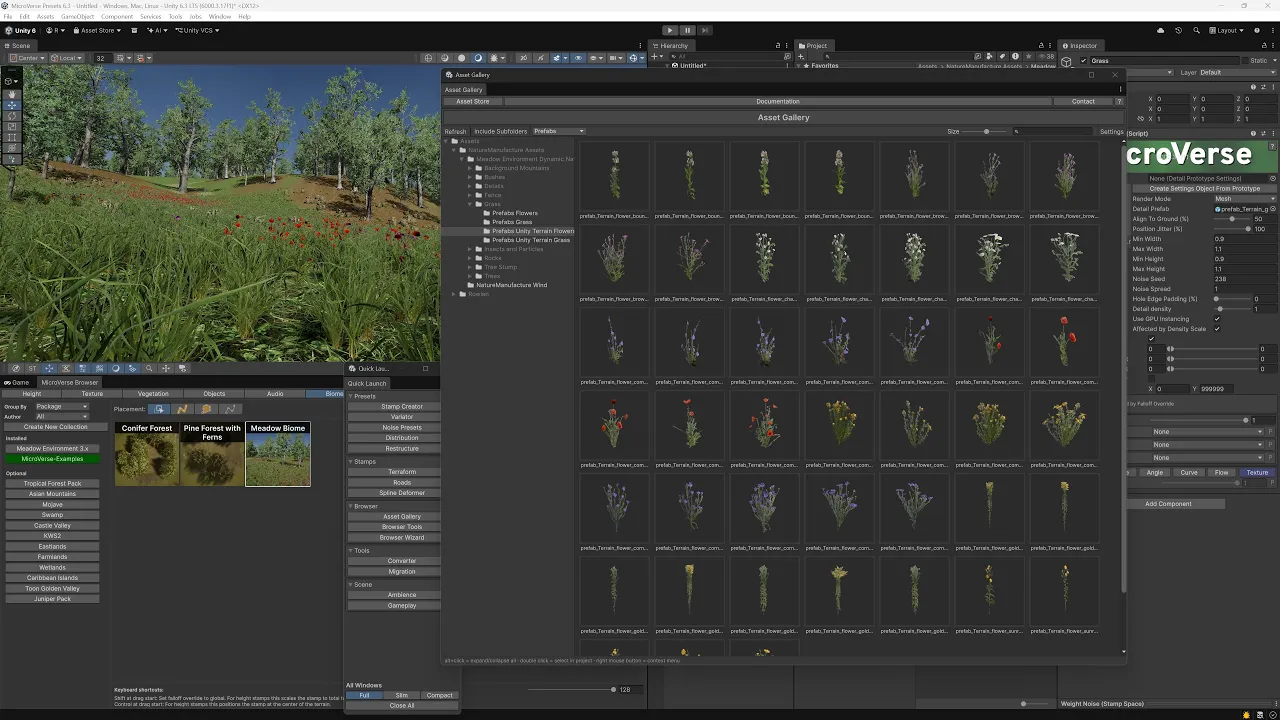
Genesis Pro - Asset Gallery ... Unparalleled Workflow with Assets from the Unity Asset Store
 Roland C
Jun 17, 2026 15:19
Roland C
Jun 17, 2026 15:19
Create an account to hide videos, mark them watched, or save them to Don't Miss.
Create an account to hide videos, mark them watched, or save them to Don't Miss.
Create an account to hide videos, mark them watched, or save them to Don't Miss.
New feature: Asset Gallery. I just couldn't wait for Unity to fix the lighting in their thumbnail preview in Unity 6. So I created my own Asset Gallery which was fairly easy to create. The additional benefit is that I could limit the visibility to prefabs and terrain layers, so you don't have to navigate through models, materials and the likes and instead just focus on what you actually need for your terrain. I don't think there's anything faster on Unity when it comes to using any asset and creating a scene with it. It's a bold statement, but feel free to prove me wrong 😁
Assets used:
* [⭐ New Release Sale ⭐] Genesis Pro for MicroVerse
https://assetstore.unity.com/packages/tools/terrain/genesis-pro-for-microverse-384942?aid=1011lfvh6&pubref=rigpmv&utm_source=aff
* [⭐ Summer Sale ⭐] MicroVerse - Core Collection
https://assetstore.unity.com/packages/tools/terrain/microverse-core-collection-232976?aid=1011lfvh6&pubref=jbmcc&utm_source=aff
* [⭐ Summer Sale ⭐] World Building Bundle for MicroVerse
https://assetstore.unity.com/packages/tools/terrain/world-building-bundle-for-microverse-243593?aid=1011lfvh6&pubref=riwbbmv&utm_source=aff
or
* Ultimate StampIT! Collection
https://assetstore.unity.com/packages/3d/environments/landscapes/ultimate-stampit-collection-221299?aid=1011lfvh6&pubref=riusc&utm_source=aff
* [⭐ Summer Sale ⭐] Meadow Environment - Dynamic Nature
https://assetstore.unity.com/packages/3d/vegetation/meadow-environment-dynamic-nature-132195?aid=1011lfvh6&pubref=nmme&utm_source=aff
Gaming