I Fixed Pixal3D's Biggest Weakness (Free Local 3D AI)
 PixelArtistry
Oct 7, 2026 13:00
PixelArtistry
Oct 7, 2026 13:00
Create an account to hide videos, mark them watched, or save them to Don't Miss.
Create an account to hide videos, mark them watched, or save them to Don't Miss.
Create an account to hide videos, mark them watched, or save them to Don't Miss.
Chapters
I'm currently building a Trellis2 + Pixal3D Workflow Pack — an in-depth PDF guide + ComfyUI workflows for local, open-source 3D AI generation. Join the waitlist for early-bird pricing:
👉 https://pixel-artistry.com/Trellis2WorkflowPackWaitlist
Join my FREE Newsletter FutureFrames to learn more about AI 3D:
https://pixel-artistry.com/newsletter
Join our FREE Discord: https://pixel-artistry.com/discord
🔗 Download the free workflow + model downloader:
https://go.pixel-artistry.com/Qwen
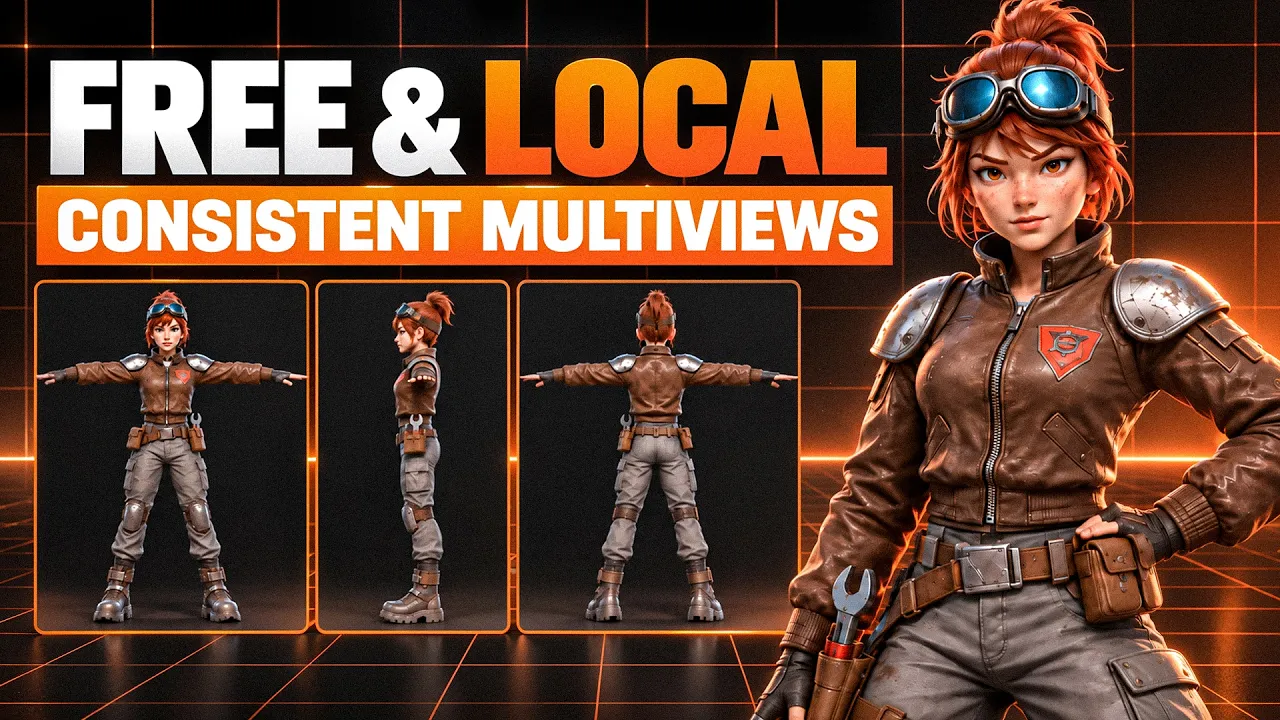
The best way to create consistent multiviews for Pixal3D locally, entirely for free. In this video I show you how to generate character concepts, turn them into consistent front, left, back and right view character sheets using Qwen Image 2.1, and feed them directly into Pixal3D for a much more accurate 3D result. Works for characters and props.
If you haven't set up Pixal3D yet, start here:
👉 Pixal3D GGUF Setup: https://pixel-artistry.com/Pixal3DGGUF
👉 Pixal3D Multiview: https://youtu.be/_lgyED4IkJg
🔹 Requirements:
Any ComfyUI version (no custom nodes needed)
Qwen Image 2.1 (open source, commercial use allowed)
Pixal3D nodes
12GB VRAM recommended (may work on 8–10GB)
~25GB disk space (16GB Qwen Image + 9GB Pixal3D)
🔹 Character prompt formula:
Subject + proportions + outfit/materials + T-pose + camera/framing (orthographic, full body, front view, 90% frame fill) + soft even lighting + plain white background + no hand-held props
🔹 Character prompt used in this video:
A young female space mechanic, stylized hero-shooter proportions, slightly larger head and hands, confident expression. Worn brown leather bomber jacket with scuffed brushed-metal shoulder pads and an orange mission patch, grey cargo pants with padded knee guards, chunky magnetic boots, a tool belt with a holstered wrench and small pouches, welding goggles pushed up on her forehead, short tied-back auburn hair with loose strands, grease smudge on one cheek. Standing in a T-pose, arms stretched straight out to the sides at shoulder height, palms facing down, fingers together, legs shoulder-width apart, feet pointing forward. Full body from head to toe, front view, orthographic, eye-level, centered, character fills 90% of the frame height, nothing cropped. Soft, even studio lighting, no harsh shadows, no reflections. Stylized 3D game character render, clean readable shapes, high-detail textures. No hand-held props, no text, no ground shadow. Plain white background.
🔹 Turnaround sheet prompt used in this video:
Turn the character in image1 into an orthographic 3D modeling reference sheet: a single horizontal row of four equal-width panels, evenly spaced. From left to right: 1) front view. 2) left side view, an exact 90° profile, only one eye visible, the near arm pointing straight at the camera and strongly foreshortened, the far arm hidden behind the body. 3) back view, exactly 180°. 4) right side view, an exact 90° profile, only one eye visible, near arm foreshortened toward the camera, far arm hidden. The camera orbits a completely static character: same T-pose and same head direction in every view, the character never turns toward the camera. Identical outfit, colors, proportions and scale in all views, each character centered in its panel, feet on the same baseline, no overlap between views. Flat, even lighting, solid black background, no text, no labels.
🔹 Seed used for the turnaround: 7855566168422
I'm building a 3D AI course and want YOUR input. Takes 2 mins only!
👉 https://forms.gle/N4idYGTN8f5BphRL6
🔹 3D & AI Tools
TripoAI: https://studio.tripo3d.ai/home?via=pi...
3DAIStudio: https://3daistudio.lemonsqueezy.com/?aff=lb8ND
Hitem3D: https://www.hi3d.ai/?utm_source=koc_kol_YTB&utm_medium=sign_up&utm_campaign=PIXELARTISTRY6
MeshyAI: https://www.meshy.ai/?via=pixelArtistry
Runpod: https://get.runpod.io/nf1f096h5zmh
⚠️ Transparency Notice: Some of the links above are affiliate links. If you purchase through these links, I may earn a small commission – at no extra cost to you. This helps support my channel – thank you so much 🙏
⏱ Timestamps
Film & Animation
#comfyui
#image to 3d
#ai 3d modeling
#3d models ai generator
#ai 3d model generator
#trellis2
#trellis2 local
#trellis2 comfyui
#comfyui 3d generator
#free 3d ai generator
#free local3d ai gen
#3d ai generator
#open source 3d ai
#3d ai blender
#image to 3d free
#microsoft
#image to 3d model
#comfyui tutorial
#blender tutorial
#best 3d ai generator
#free best 3d ai
#hunyuan3d
#blender
#ai 3d generator
#hunyuan3d studio
#ai texturing
#ai retopo
#ai texturing 4k
#new 3d ai