Vertex Toolset
 Jason Booth
Jan 10, 2016 18:30
Jason Booth
Jan 10, 2016 18:30
Create an account to hide videos, mark them watched, or save them to Don't Miss.
Create an account to hide videos, mark them watched, or save them to Don't Miss.
Create an account to hide videos, mark them watched, or save them to Don't Miss.
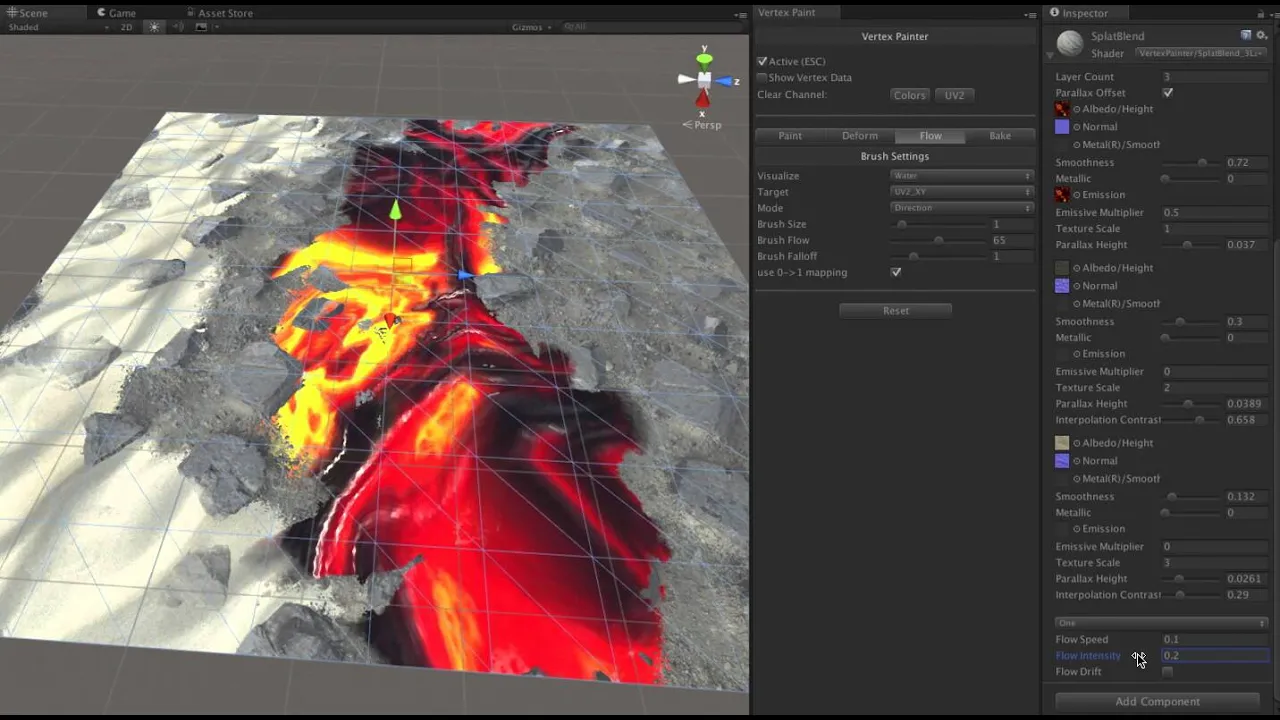
Preview of a vertex toolset and shading system I'm working on for Unity. It uses the new addtiionalVertexStream's feature of Unity 5 to allow you to paint on instances of meshes in the scene, saving that data with the scene. At runtime, these streams are added to the meshes without modifying the original mesh.
The system allows you to not only paint vertex colors, but all 4 UV channels, and all 4 values of each of these channels individually. It allows you to not only paint values, but directions which can be used for Flow Mapping..
The included shader allows for 5 layers of Splat Mapping with 1 layer of flow mapping in a PBR environment. Each layer blends with the other layers based on the values in the color channels, and is resolved based on height map data in the textures. This allows for a natural blend between the surfaces.
The toolkit also contains support for baking out the result to new meshes, deforming meshes (ala a very simple z-brush like tool), baking ambient occlusion and lighting data, and baking pivot information (useful for special effects).
All information, including flow directions, can be easily previewed via custom preview shaders.
out now:
https://github.com/slipster216/VertexPaint
Music
#Unity
#Splat Mapping
#Texture
#Games
#Environment Art