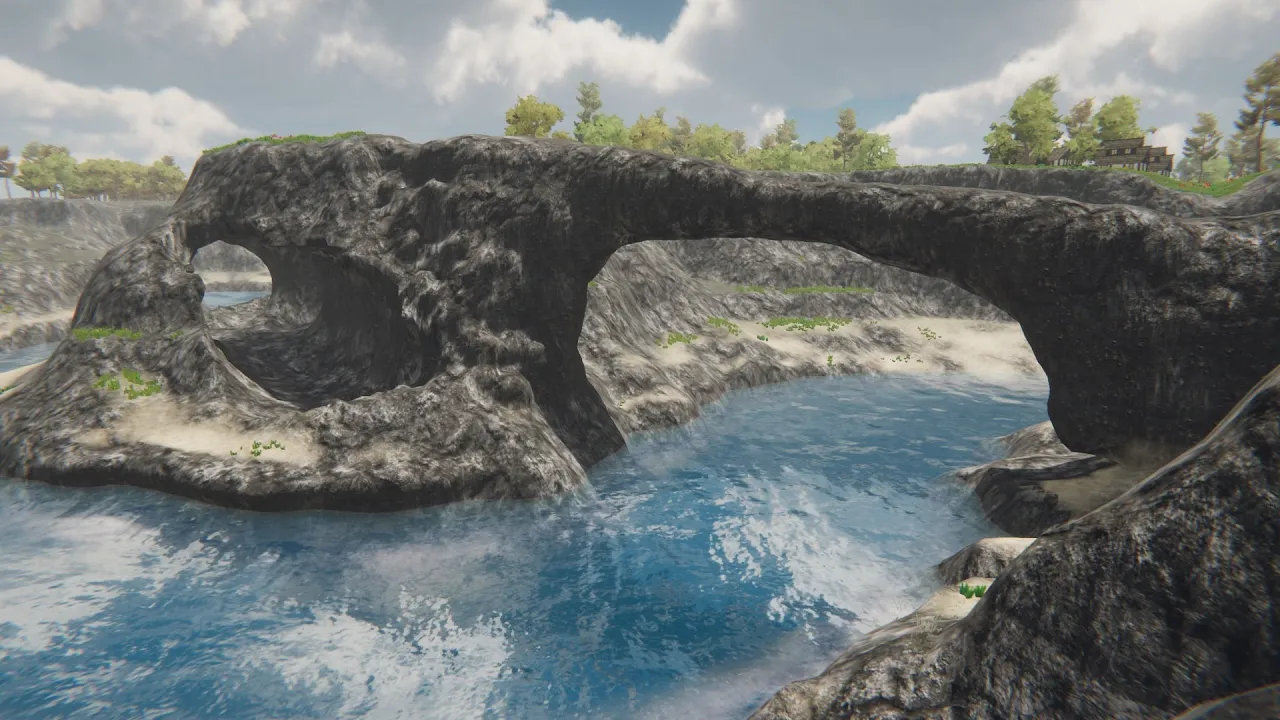
Create holes, caves, arches and overhangs on your Unity terrain with Digger!
 Amandine Entertainment
Jan 26, 2019 19:50
Amandine Entertainment
Jan 26, 2019 19:50
Create an account to hide videos, mark them watched, or save them to Don't Miss.
Create an account to hide videos, mark them watched, or save them to Don't Miss.
Create an account to hide videos, mark them watched, or save them to Don't Miss.
DIGGER is the ideal solution to quickly dig true holes and caves in your terrain. You can also add some overhangs, create an arch, or whatever you want. Support: https://discord.gg/C2X6C6s
Download Digger from the Asset Store: https://assetstore.unity.com/packages/tools/terrain/digger-135178
Unity built-in terrains are heightmap-based. This means that it can handle elevation but not volumes such as 3D holes or overhangs. DIGGER get rid of this limitation by generating seamless meshes just where you dig or add mater. It's like a combination of a normal terrain and a voxel terrain.
Gaming
#holes
#terrain
#unity
#cave
#arch
#dig
#dig holes
#unity terrain
#terrain cave
#make holes in unity terrain
#dig in unity terrain
#make caves in unity terrain
#unity terrain overhangs
#overhangs